![[GPU]GPU 셋팅 시 버전 체](/img/covers/dev_hu_8e67a3e703dc4371.jpg)
1. GPU가 사용 가능한 상태인지 확인#
import os
os.environ['CUDA_DEVICE_ORDER']="PCI_BUS_ID"
os.environ['CUDA_VISIBLE_DEVICES']='0'
device = torch.device('cuda' if torch.cuda.is_available() else 'cpu')
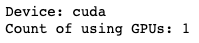
print('Device:', device)
# print('Current cuda device:', torch.cuda.current_device())
print('Count of using GPUs:', torch.cuda.device_count())
[Out]
2. 해당 서버 또는 컨테이너의 shell에서 CUDA버전을 확인#
- CUDA버전과 torch관련 라이브러리의 버전이 모두 호환되어야 GPU사용이 ‘True’로 출력된다.
#서버접속

ssh -p 2022 root@10.70.189.5


#cuda버전 확인(상단에 'CUDA 10.1' 과 같은 형태로 노출)
watch -d -n 0.5 nvidia-smi
3. 해당 CUDA버전과 호환되는 torch버전 확인#
- torch install link : https://pytorch.org/get-started/previous-versions/
[PyTorch
An open source machine learning framework that accelerates the path from research prototyping to production deployment.
pytorch.org](https://pytorch.org/get-started/previous-versions/)
예시)
# CUDA 10.1
pip install torch==1.8.1+cu101 torchvision==0.9.1+cu101 torchaudio==0.8.1 -f https://download.pytorch.org/whl/torch_stable.html
4. 터미널 또는 Jupyter notebook 스크립트에서 위 설치 명령문을 실행해서 설치한다.#
pip3 list |grep torch
#
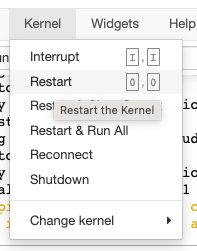
5. jupyter notebook을 restart한다#
- 위 내용이 반영되기 위해 재시작한다.
6. GPU가 사용가능한 상태인지 확인한다.#
